
Deploy Kestra
Workflows for data, AI and operations with Kestra
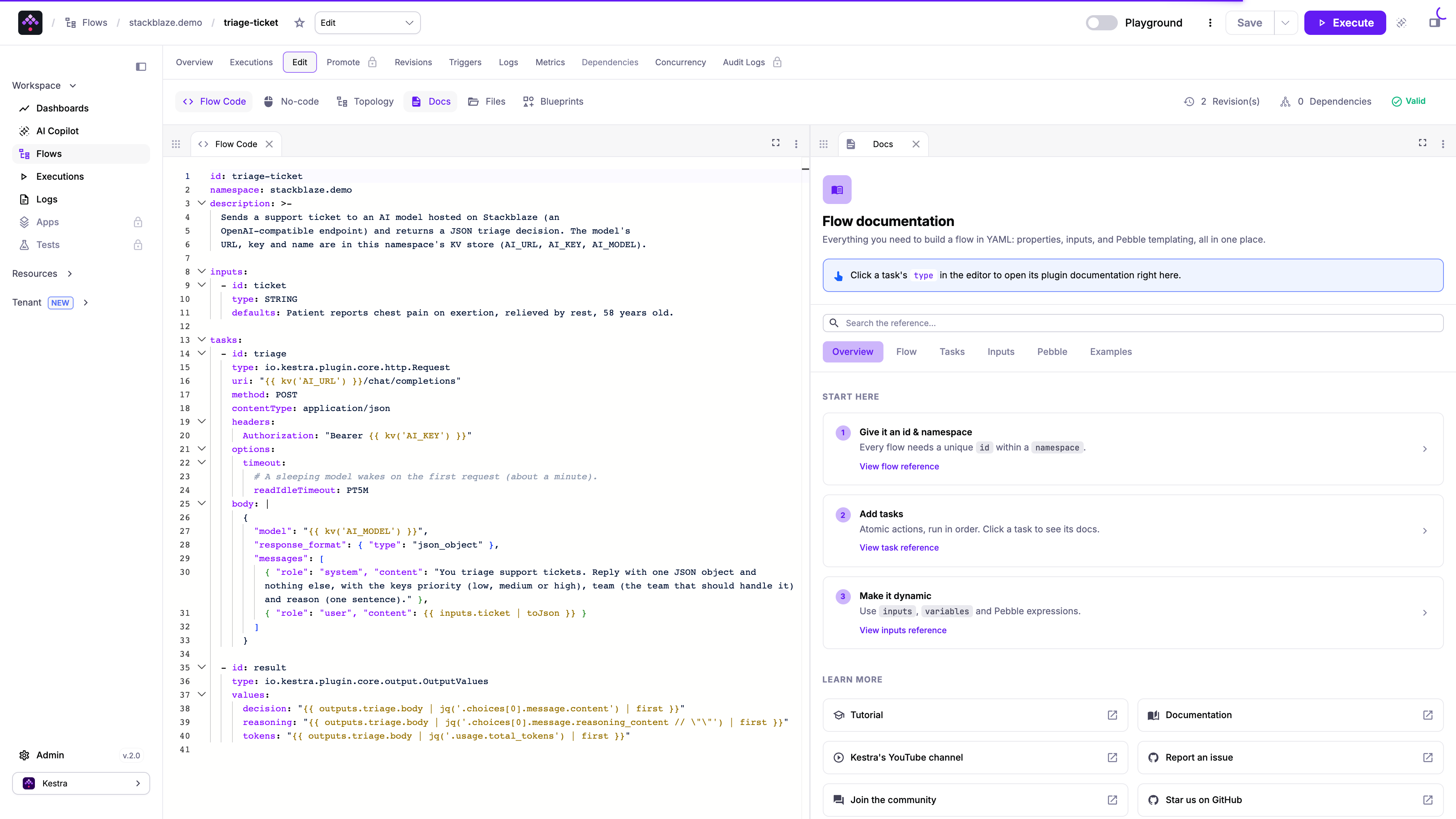
Write flows in YAML, run them on a schedule, a webhook or an event, and follow every execution, log and output in Kestra’s web UI. Flows can call an AI model on any OpenAI-compatible endpoint, including a model you host yourself. The admin account is ready when the app starts.
What you get with Kestra
- Flows in YAMLEach flow is a YAML file with inputs, tasks and outputs. Edit it in the browser editor, with the plugin docs open beside it.
- Schedules, webhooks and eventsStart a flow on a cron schedule, from a webhook call, from another flow, or by hand from the UI.
- Every run on recordExecutions, logs, outputs and metrics for each run are kept in PostgreSQL and shown in the UI.
- AI models in flowsFlows can call any OpenAI-compatible model, including one you host yourself. The built-in AI Copilot runs on Google Gemini.
- Admin account at deployThe admin email and a generated password are set in the configuration, so the setup page never opens and nobody else can claim the instance.
- HTTPS web accessOpen Kestra on a public HTTPS hostname. Attach your own domain when you want a branded URL.
After you deploy Kestra
- 1Sign in
Open the public URL and sign in with
ADMIN_EMAILandADMIN_PASSWORDfrom the app’s Variables. The first start can take a few minutes. - 2Create a flow
Go to Flows, then Create. Start from a blueprint or write the YAML yourself, then Save and Execute.
- 3Connect a model for flows (optional)
Under Variables, set:
MODEL_URL- Your LLM model’s base URL, ending in
/v1 MODEL_API_KEY- Its API key or password
MODEL_NAME- The name of the model it serves
Flows read them as
{{ envs.model_url }},{{ envs.model_api_key }}and{{ envs.model_name }}. Saving restarts the app. - 4Turn on the AI Copilot (optional)
Under Variables, set:
GEMINI_API_KEY- Your Google Gemini API key
GEMINI_MODEL- The Gemini model. Default:
gemini-3.5-flash-lite COPILOT_ENABLEDtrueto turn the Copilot on. Default:false
In Kestra’s community edition the Copilot works only with Gemini. Your own model is for flows.
How Kestra is wired
Kestra runs as one service in standalone mode: web server, scheduler, executor and worker in one process. PostgreSQL holds the flows and their history.
- PostgreSQL holds the state
- Flows, executions, logs, the key-value store and the queue live in the attached database. A restart keeps them.
- Task files on a volume
- Files written by tasks go to /app/storage on a shared volume, so they survive a redeploy.
- Scripts run in the container
- Script tasks use the Process task runner. There is no Docker inside the container, so Docker-based task runners do not apply.
- Email from flows
- With the Email add-on, the MailSend task sends mail using {{ envs.smtp_host }} and the other envs.smtp_* values.
Why run Kestra on StackBlaze
- Scale your appChange CPU, RAM, and replicas without a rebuild, or let autoscaling add replicas when CPU climbs.
- Git-based CI/CDPush to GitHub and it builds and ships. Pull requests get their own preview URL on Pro and Business.
- One-click rollbackA deploy went wrong? Go back to any previous successful deploy.
- Environments built inProduction, staging, and dev as separate environments in one project, each with its own URL.
- Built-in observabilityCPU, memory, and response time per app, live logs with search, and alerts to Slack, Discord, or a webhook.
- Developer-first toolsA CLI and Stack MCP: deploy, read logs, and wire services from your terminal or your AI assistant.
- Built for teamsInvite teammates with roles. An audit log records who changed what.
- Managed Postgres with HAPostgres is run for you. Turn on high availability for a three-node cluster when the app needs it.
Common questions about Kestra
How do I sign in after deploy?
Use ADMIN_EMAIL and ADMIN_PASSWORD from the app’s Variables. The account is created from the configuration before the app is reachable, so there is no setup page to claim.
How does a flow call an AI model?
Set MODEL_URL, MODEL_API_KEY and MODEL_NAME to any OpenAI-compatible endpoint: a hosted API or your own model server. A flow reads them as {{ envs.model_url }}, {{ envs.model_api_key }} and {{ envs.model_name }}, for example in an HTTP request to /chat/completions.
Can I use a model I host myself?
Yes. Under Variables, set:
MODEL_URL- Your LLM model’s base URL, ending in
/v1 MODEL_API_KEY- Its API key or password
MODEL_NAME- The name of the model it serves
Nothing else is needed. Saving restarts the app.
Which variables set up AI?
Six, all optional. The first three connect a model for flows, the last three turn on the AI Copilot:
MODEL_URL- Your LLM model’s base URL, ending in
/v1 MODEL_API_KEY- Its API key or password
MODEL_NAME- The name of the model it serves
GEMINI_API_KEY- Your Google Gemini API key
GEMINI_MODEL- The Gemini model. Default:
gemini-3.5-flash-lite COPILOT_ENABLEDtrueto turn the Copilot on. Default:false
Flows read the first three as {{ envs.model_url }}, {{ envs.model_api_key }} and {{ envs.model_name }}. Saving a variable restarts the app.
Can the AI Copilot use my own model?
No. In Kestra’s community edition the Copilot works only with Google Gemini, set by GEMINI_API_KEY and GEMINI_MODEL. It also sends Kestra’s whole plugin catalog with each request, which a small self-hosted model cannot take. Your own model (MODEL_URL, MODEL_API_KEY, MODEL_NAME) is for flows.
Where is my data stored?
Flows, runs and logs are in the attached PostgreSQL. Files from tasks are on the app’s volume at /app/storage.
Can I use my own domain?
Yes. Attach a custom domain from the dashboard. Custom domains
What does it cost?
You pay for the compute, memory and storage Kestra and its database use, not per flow, run or user. Pricing
More Development templates
 nocodbBuild databases as spreadsheets: tables with typed fields, grid, kanban, gallery, form and calendar views, and a REST API for every table. An open source Airtable alternative on your own Postgres.
 infisicalOpen-source secrets manager: store, version and sync app secrets across projects and environments, with machine identities for CI and servers, an internal PKI and audit logs.
 vLLMConnect a vLLM model server running on a GPU and use it from your project through one OpenAI-compatible API with its own key. Streaming, JSON output, tool calling and reasoning pass through unchanged.
 LiteLLMLLM gateway with one OpenAI-compatible API for 100+ model providers. Virtual keys, budgets, rate limits, spend tracking and an admin UI.