
helpdesk
Deploy LibreDesk in one click
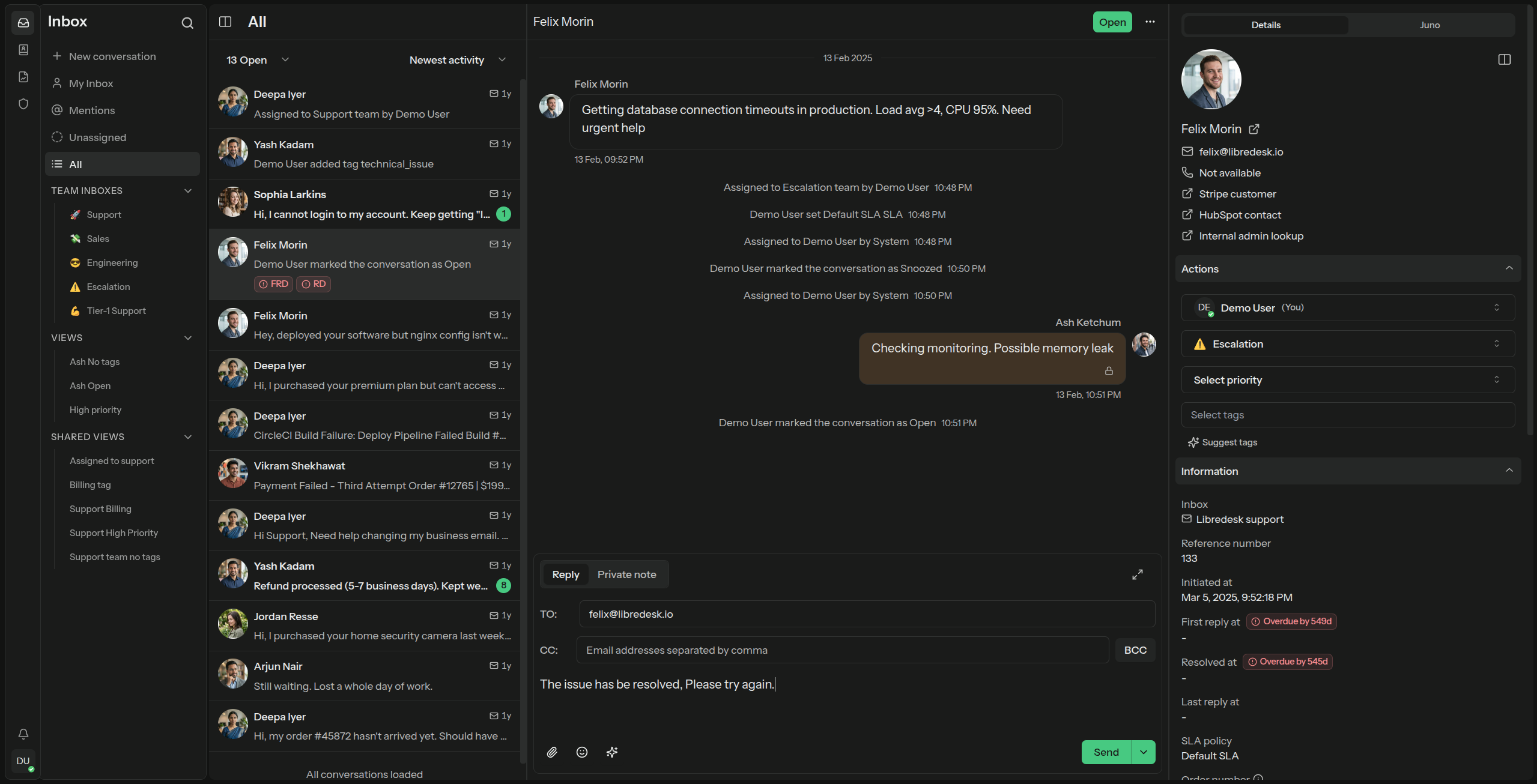
Modern, open-source omnichannel customer support desk with live chat, email, a help center, and automations. A self-hosted alternative to Zendesk and Help Scout.
TemplatesLibreDesk
Deploy
What gets deployed
Image ghcr.io/stackblaze/libredesk (Stackblaze fork of LibreDesk). First boot installs the schema and creates the System user. Sign in with email System and the password in LIBREDESK_SYSTEM_USER_PASSWORD (generated once at create; change it after login). Then set the public URL in Admin settings — app.root_url defaults to http://localhost:9000, which breaks links and the chat widget. The encryption key is generated once; do not change it after data exists. Uploads persist on the shared volume. Notification email is stored in Admin → Settings: copy SMTP_HOST, SMTP_PORT, SMTP_USER, SMTP_PASSWORD, and SMTP_FROM (STARTTLS on 587). Customer inboxes are added in the LibreDesk admin.
This stack
Web
LibreDesk server
PostgreSQL
managed database · TCP:5432
Valkey
managed cache · TCP:6379
managed other · TCP:587
Image ghcr.io/stackblaze/libredesk (Stackblaze fork of LibreDesk). First boot installs the schema and creates the System user. Sign in with email System and the password in LIBREDESK_SYSTEM_USER_PASSWORD (generated once at create; change it after login). Then set the public URL in Admin settings — app.root_url defaults to http://localhost:9000, which breaks links and the chat widget. The encryption key is generated once; do not change it after data exists. Uploads persist on the shared volume. Notification email is stored in Admin → Settings: copy SMTP_HOST, SMTP_PORT, SMTP_USER, SMTP_PASSWORD, and SMTP_FROM (STARTTLS on 587). Customer inboxes are added in the LibreDesk admin.
After you deploy
Image ghcr.io/stackblaze/libredesk (Stackblaze fork of LibreDesk). First boot installs the schema and creates the System user. Sign in with email System and the password in LIBREDESK_SYSTEM_USER_PASSWORD (generated once at create; change it after login). Then set the public URL in Admin settings — app.root_url defaults to http://localhost:9000, which breaks links and the chat widget. The encryption key is generated once; do not change it after data exists. Uploads persist on the shared volume. Notification email is stored in Admin → Settings: copy SMTP_HOST, SMTP_PORT, SMTP_USER, SMTP_PASSWORD, and SMTP_FROM (STARTTLS on 587). Customer inboxes are added in the LibreDesk admin.
Reference
Environment variables
Set at deploy. Empty values are yours to fill.
| Variable | Description | Required |
|---|---|---|
| LIBREDESK_APP__ENV | Default: prod | Optional |
| LIBREDESK_APP__LOG_LEVEL | Default: info | Optional |
| LIBREDESK_APP__ENCRYPTION_KEY | Default: {{KUBERO_GEN_HEX:32}} | Optional |
| LIBREDESK_APP__SERVER__ADDRESS | Default: 0.0.0.0:9000 | Optional |
| LIBREDESK_SYSTEM_USER_PASSWORD | Default: Aa1!{{KUBERO_GEN_ALNUM:16}} | Optional |
| LIBREDESK_DB__HOST | Default: $(PGHOST) | Optional |
| LIBREDESK_DB__PORT | Default: $(PGPORT) | Optional |
| LIBREDESK_DB__USER | Default: $(PGUSER) | Optional |
| LIBREDESK_DB__PASSWORD | Default: $(PGPASSWORD) | Optional |
| LIBREDESK_DB__DATABASE | Default: $(PGDATABASE) | Optional |
| LIBREDESK_DB__SSL_MODE | Default: disable | Optional |
| LIBREDESK_REDIS__URL | Default: $(REDIS_URL) | Optional |
| LIBREDESK_UPLOAD__PROVIDER | Default: fs | Optional |
| LIBREDESK_UPLOAD__FS__UPLOAD_PATH | Default: uploads | Optional |
Ready to deploy LibreDesk?
One click. Dependencies pre-wired. No infrastructure to manage.