
Automation
Automate workflows on your own instance
Deploy n8n with managed Postgres, Valkey, a worker, and a public HTTPS URL for the editor and webhooks. You own the instance. You pay for compute — not per workflow run.
Templatesn8n Automation
What you get
A private n8n, packaged to ship
Visual builder, credentials, and execution history on your instance — Postgres, Valkey, the worker, and the public URL are wired at deploy.
Visual workflows
Build automations with nodes, branches, retries, and execution history instead of wiring every integration by hand.
App integrations
Connect SaaS tools, databases, HTTP APIs, webhooks, and internal services with n8n nodes and credentials.
Custom logic
Use code nodes and HTTP requests when a workflow needs a transform, a branch, or an API that has no dedicated node.
Owner login
First boot is a one-time owner setup at your app URL. Turn on Load demo data to start as demo@stackblaze.local / changeme.
Managed Postgres
Workflows, credentials, and executions live in CloudNativePG — not a SQLite file inside the container.
Public webhook URL
WEBHOOK_URL and the editor base URL are set to your https://…stackblaze.app hostname so callbacks reach this instance.
See n8n in action
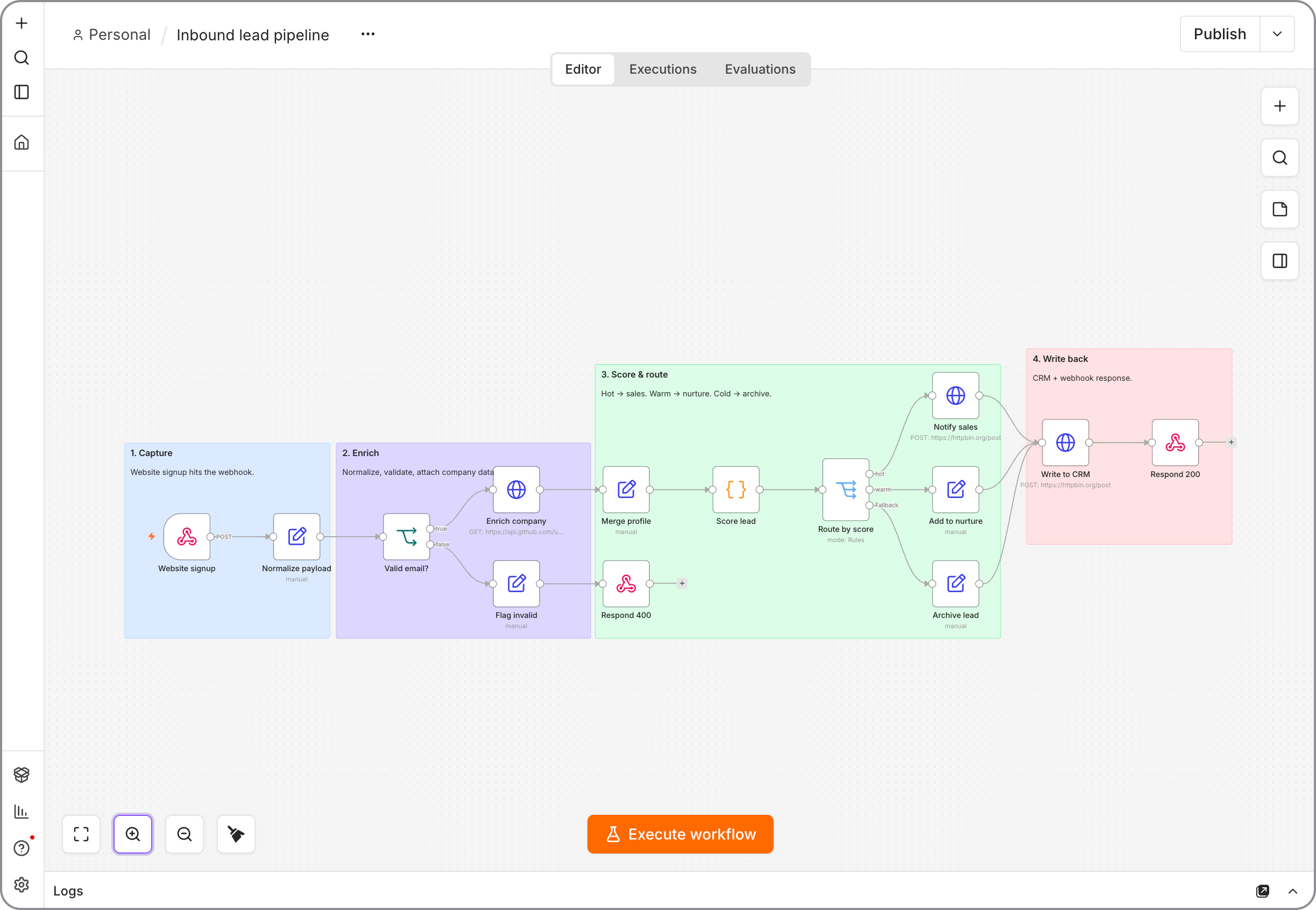
Deploy in seconds
One click. Postgres and Redis pre-wired.
Pick the n8n template. StackBlaze creates the editor, a worker, Postgres, and Valkey, sets the public URL, and gives you a hostname.
This stack
Web
n8n Automation server
PostgreSQL
managed database · TCP:5432
Valkey
managed cache · TCP:6379
managed other · TCP:587
n8n-worker
queue worker
- Stack
- n8n editor + worker + PostgreSQL + Valkey
- First login
- Owner setup at your URL, or demo data if you enable it
- Webhooks
- HTTPS hostname is already the webhook base
After you deploy
- 1
Open the public URL
The hostname is on the app page after deploy. First load is owner setup — not a login form.
- 2
Create the owner
Email, password, first name, last name. That account owns the instance until you invite others.
- 3
Skip demo data unless you want a head start
Enable Load demo data at deploy to land in a sample workspace (demo@stackblaze.local / changeme) instead of a blank canvas.
Running n8n on StackBlaze
How the instance is wired
n8n, Postgres, and Valkey ship together. The editor and webhooks share one hostname; the worker runs executions from the queue.
Postgres holds the workspace
Workflows, credentials, and execution history live in the attached database. Restart the editor and the workspace is still there.
Redis workers, on purpose
Valkey holds the job queue. A companion worker runs executions so a heavy run does not stall the canvas. Scale the worker when the queue backs up.
One URL for editor and webhooks
The public hostname is the editor, the login page, and the webhook base. Attach a custom domain from the dashboard when you want a branded callback.
Add CPU when the canvas gets heavy
Raise RAM and CPU on the editor or the worker from the dashboard. Postgres and Valkey scale on their own.
Compare
n8n on StackBlaze vs hosted automation SaaS
| Feature | n8n on StackBlaze | Hosted automation SaaS |
|---|---|---|
| Data location | Workflows, credentials, and executions live on your StackBlaze instance. | Automation data lives in vendor-operated infrastructure. |
| Install model | One-click template. Owner account on first open. | Create a vendor account and use their shared platform. |
| Customization | n8n nodes, HTTP, code nodes, and your own env vars. | Limited to the host’s plan, connectors, and runtime rules. |
| Operations | You control updates, scale, backups, and the instance lifecycle. | The vendor operates the platform and the limits. |
| Billing | Compute, storage, and bandwidth. No per-run fee. | Usually priced per task, operation, or seat. |
This template is n8n plus Postgres, Valkey, and a worker. Executions run off the editor.
FAQ
Common questions
Open the public URL. Complete the one-time owner setup. If Load demo data was enabled, sign in as demo@stackblaze.local / changeme. If you get sent back to /setup, the database and the app are out of sync — delete both and redeploy.
Ready to deploy n8n Automation?
One click. Dependencies pre-wired. No infrastructure to manage.