
Import a database dump
Load a pg_dump or mysqldump file into a PostgreSQL or MariaDB database with the CLI, check the rows, and fix the common errors.
To move an existing database onto StackBlaze, make a dump of it and load the dump with stackblaze addons import. There is no import button in the dashboard: it's a CLI command. You check the result in the database's SQL console.
stackblaze import is a different command: it creates services from a stack file. See Import a stack.
Two ways to load a dump
- In the platform (the default, PostgreSQL only). The CLI uploads your file once, and the platform loads it next to the database. You don't need any database tools on your machine, and your machine isn't in the data path while it loads.
- From your machine (
--local, PostgreSQL and MariaDB). The CLI opens a private tunnel to the database, likestackblaze connect --local, and runspsql,pg_restoreormysqlfrom your machine through it. The database is never opened to the internet. Use this for MariaDB dumps and for PostgreSQL directory dumps (pg_dump -Fd).
Before you start
- A current CLI (
stackblaze upgrade), signed in. - The database is Running, and you know its name (the instance name on its card, for example
postgresql-7ytg). - The database is empty, or at least has none of the tables the dump creates. A dump is loaded into the database's existing contents.
- For the in-platform import, the database's disk has about 3 times the dump's unpacked size free. Otherwise the import is refused before anything is uploaded. Expand its storage first.
- For
--local: an app in the environment that is connected to the database, and the client tools (psql/pg_restore, ormysql) on yourPATH.
Import a PostgreSQL dump
Make the dump
Make a custom-format archive with pg_dump, without owners and privileges:
pg_dump -Fc --no-owner --no-acl -d "postgresql://user:password@host:5432/shop" -f backup.dumpUse a pg_dump of the same PostgreSQL major version as the target database (new databases run PostgreSQL 17), or an older one.
Load it
Name the database, the project and the environment:
stackblaze addons import backup.dump postgresql-7ytg -p github-demo-gv35 -e dev --waitThe CLI says what it will do and asks you to type yes:
! This loads backup.dump into PostgreSQL add-on "postgresql-7ytg" of github-demo-gv35/dev on <API URL>, inside the cluster. It writes into the existing database: use an empty one.With --wait it follows the import to the end. Ours, a small archive, took about 30 seconds:
Uploading backup.dump (PostgreSQL custom-format archive, 7.3 KB)…
Uploading: 100% (7.3 KB/7.3 KB)
Import import-postgresql-7ytg-1795591902583-d13ee8 started in the cluster (uploaded file).
  pending … 0s
  fetch: downloading the dump in the cluster … 14s
  verify: checking the dump (complete, readable) … 25s
  restore: loading it into the database … 29s
OK Imported 2 tables, 250 rows (7.3 KB, custom archive) — "postgresql-7ytg" (import-postgresql-7ytg-1795591902583-d13ee8).
Without --wait, the CLI starts the import and returns, and the import carries on in the platform:
OK Started import import-postgresql-7ytg-1795592089192-e4c564 of "postgresql-7ytg" in the cluster. Re-run with --wait to follow one.To check on it later, read its status with the id it printed:
stackblaze api GET /api/pipelines/github-demo-gv35/dev/db/postgresql-7ytg/transfers/import-postgresql-7ytg-1795592089192-e4c564The answer has a state (pending, running, succeeded or failed), the step, and either a result (format, bytes, tables, rows) or an error. The status is kept for a day after the import ends. Only one import runs per database at a time.
Check the data
Open the database's SQL console from the db.… address on its card, and count the rows:
select (select count(*) from docs_import_customers) as customers,
       (select count(*) from docs_import_orders) as orders;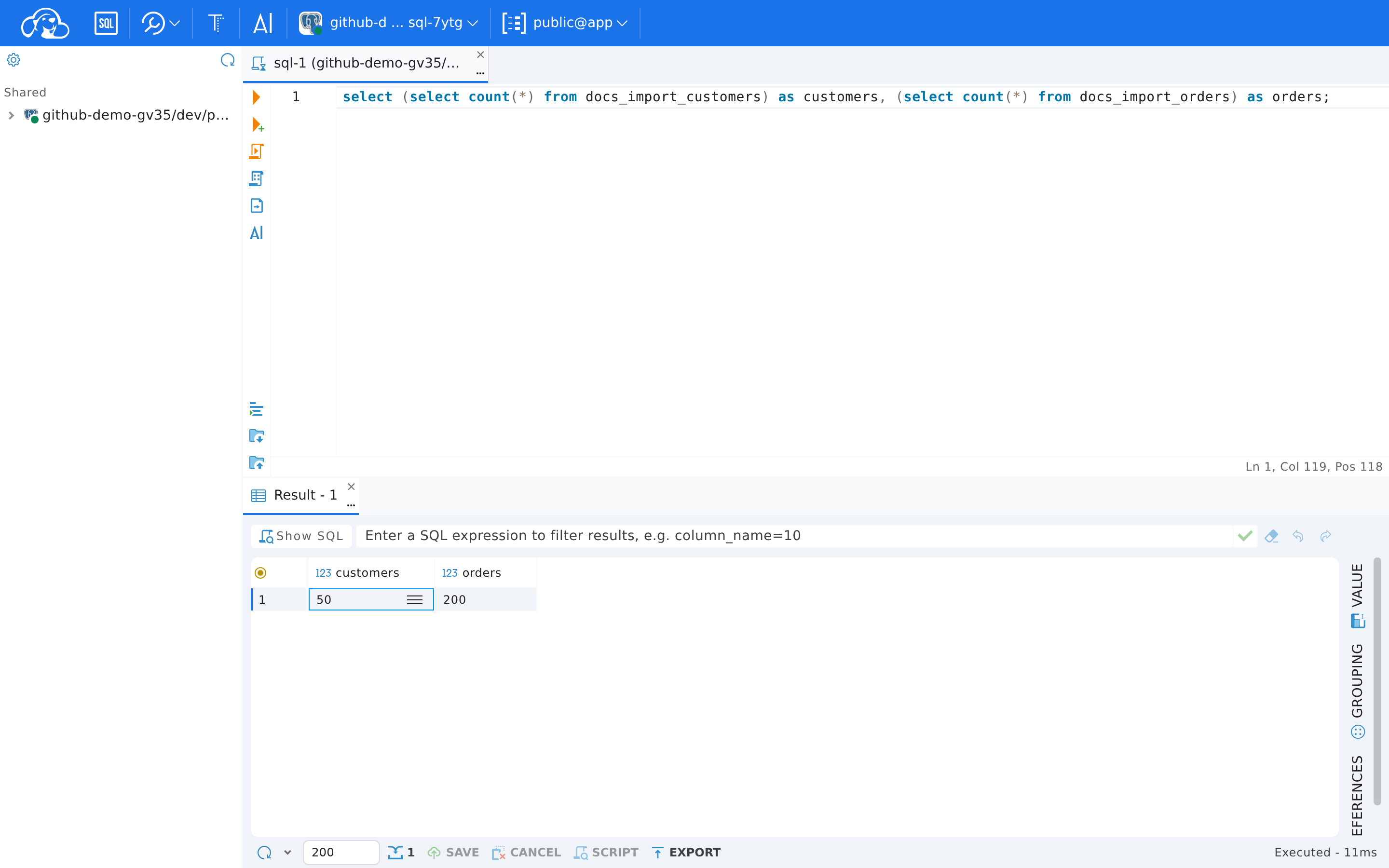
What the import accepts
- A local file, uploaded once, up to 5 GB.
- An http(s) URL that the platform downloads, for example a presigned link to your own storage. Quote it in the shell:
stackblaze addons import "https://…/backup.dump?sig=…" postgresql-7ytg -p shop --wait. The URL can't carry a user name or password. - Formats: a custom-format archive (
pg_dump -Fc), also gzipped; a tar archive (pg_dump -Ft, with--jobs 1); or plain SQL (pg_dumpwithout-F), also gzipped (.sql.gz). A directory dump (-Fd) can't be uploaded: use--local.
TimescaleDB databases can't take an in-platform import yet.
How the dump is checked and loaded
The platform checks the dump before it writes anything:
- An archive must list cleanly and read to its end, so a cut-off archive is refused.
- Plain SQL must contain pg_dump's
-- PostgreSQL database dump completeline, so a truncated file is refused.
Then it loads it:
- An archive with
pg_restore --no-owner --no-privileges, using 2 parallel workers by default (--jobs1 to 8). The loaded objects belong to the database's own user. - Plain SQL with
psql, as written. Make plain dumps with--no-owner --no-acl, or they fail on roles the database doesn't have.
Both stop at the first error. The database may then be partly loaded: clean it up before you try again.
Import a MariaDB dump
MariaDB dumps load from your machine with --local, through an app connected to the database.
mysqldump --single-transaction shop > mdb.sql
stackblaze addons import mdb.sql --local --instance mariadb-92xp-ha -p my-first-project-h22a -e dev -a nginx-w29bLoading mdb.sql (plain SQL) into "mariadb-92xp-ha" with local mysql…
OK Imported mdb.sql into "mariadb-92xp-ha".The CLI also reads a gzipped .sql.gz. Check the tables in the database's SQL console, or with stackblaze connect mysql.
Import from your machine (--local)
With --local, the CLI reads the dump's format from its content (a custom, tar or directory archive, or plain SQL, also gzipped) and runs the matching tool on your machine:
stackblaze addons import shop.dir --local --instance postgresql-u0kr -p my-first-project-h22a -e dev -a nginx-w29b- Your
pg_restoremust be at least as new as thepg_dumpthat made the archive. - By default a PostgreSQL load carries on past errors and reports how many it ignored.
--stop-on-errorstops at the first one. --clean(PostgreSQL archives) drops the objects the dump recreates first. Re-running an archive we had already loaded failed with 10 errors; with--cleanit loaded cleanly.
Options
| Option | |
|---|---|
[addon], --addon <name> | The database to load into |
--instance <name> | The database, when several match |
-p, -e, -a | Project, environment (default production) and app |
--wait | Follow the import to its end and print the result |
--timeout <seconds> | Longest --wait (default 21600; 0 means no limit). The import carries on after it |
--jobs <n> | Parallel pg_restore workers for an archive, 1 to 8 (default 2) |
--local | Run the client tools on your machine through a private tunnel |
--clean | With --local and a PostgreSQL archive: drop the objects the dump recreates first |
--stop-on-error | With --local: stop at the first error |
-y, --yes | Don't ask before loading |
The CLI exits with 0 when the import succeeded, 1 when it failed, and 3 when the platform refused it (for example the disk check, or another import of the same database still running).
Troubleshooting
These are the messages we got on purpose, and what to do.
| Message | What to do |
|---|---|
This 400.0 MB dump needs about 1.2 GB free (3x its size) on the database's disk, which has 913.3 MB free. Increase its storage first. | Expand the database's storage, then import again. |
A dump upload is at most 5.0 GB. | Put the dump on your own storage and import it from an https URL. |
Not a readable PostgreSQL dump (pg_dump plain SQL or -Fc archive): pg_restore: error: could not read from input file: end of file | The archive is cut off. Copy or make it again. |
The SQL dump is incomplete: it has no '-- PostgreSQL database dump complete' line (truncated?). | The SQL file is cut off. Make it again. |
A directory archive (pg_dump -Fd) cannot be uploaded: use pg_dump -Fc, or --local. | Make a -Fc archive, or import with --local. |
pg_restore: error: parallel restore is not supported with this archive file format | A tar archive (-Ft): add --jobs 1. |
psql:<stdin>:5: error: invalid command \restrict | Your pg_dump is a newer minor release than the database's psql. Use a custom-format archive (-Fc) instead of plain SQL. |
ERROR: role "shopowner" does not exist | A plain SQL dump made with owners. Make it again with --no-owner --no-acl. |
ERROR: relation "docs_import_customers" already exists | The database already has the dump's tables. Load into an empty database, or drop them first. |
Could not download the dump (curl exit 22): check that the URL is reachable and not expired. | The URL answered with an error. Check it, or make a new presigned link. |
An import or export of this database is still running (…). Wait for it to finish. | One import at a time per database. Wait, then try again. |
pg_restore: error: unsupported version (1.16) in file header | With --local: your pg_restore is older than the pg_dump that made the archive. Upgrade your client tools. |
mysql is not installed or not on PATH. | With --local: install a MySQL or MariaDB client. |
Copy a database inside StackBlaze
To copy a database that already runs on StackBlaze, you don't need a dump: back it up and restore the recovery point as a copy.