
Troubleshooting
Find out why a deploy failed or a service doesn't answer, fix the common causes, and what to send support.
When a deploy fails, the previous version keeps running. Start on the service's Deployment tab: the failed row says what went wrong, and Diagnose explains it.
Start with Diagnose
Open the service and click Deployment. A failed deploy shows Deploy failed in red, a box with what happened, and Diagnose.
Here the build failed: the app's npm build script exited with code 1. The box reads "The deploy was aborted and the previous version keeps running. Check the build logs for the failing step."
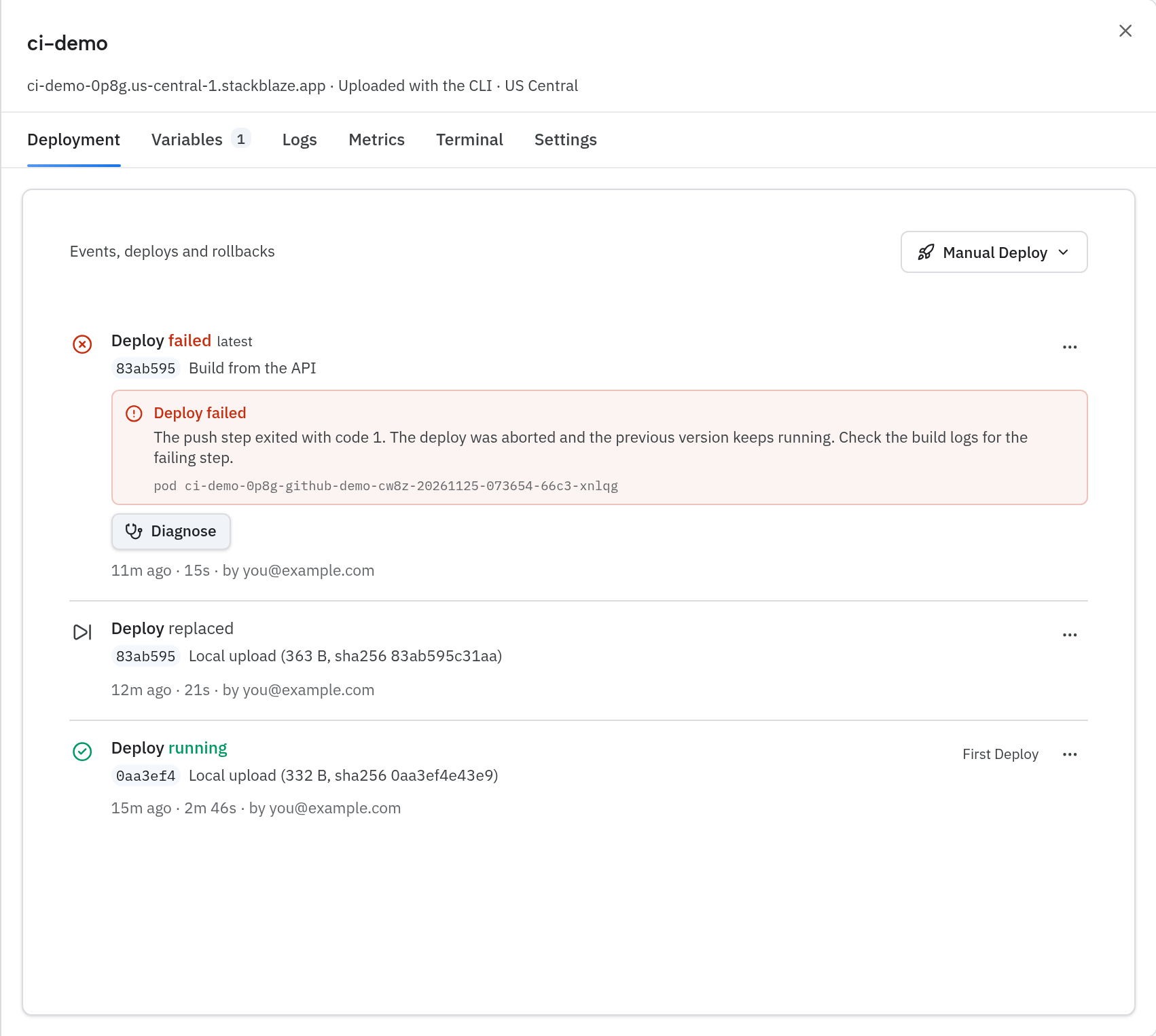
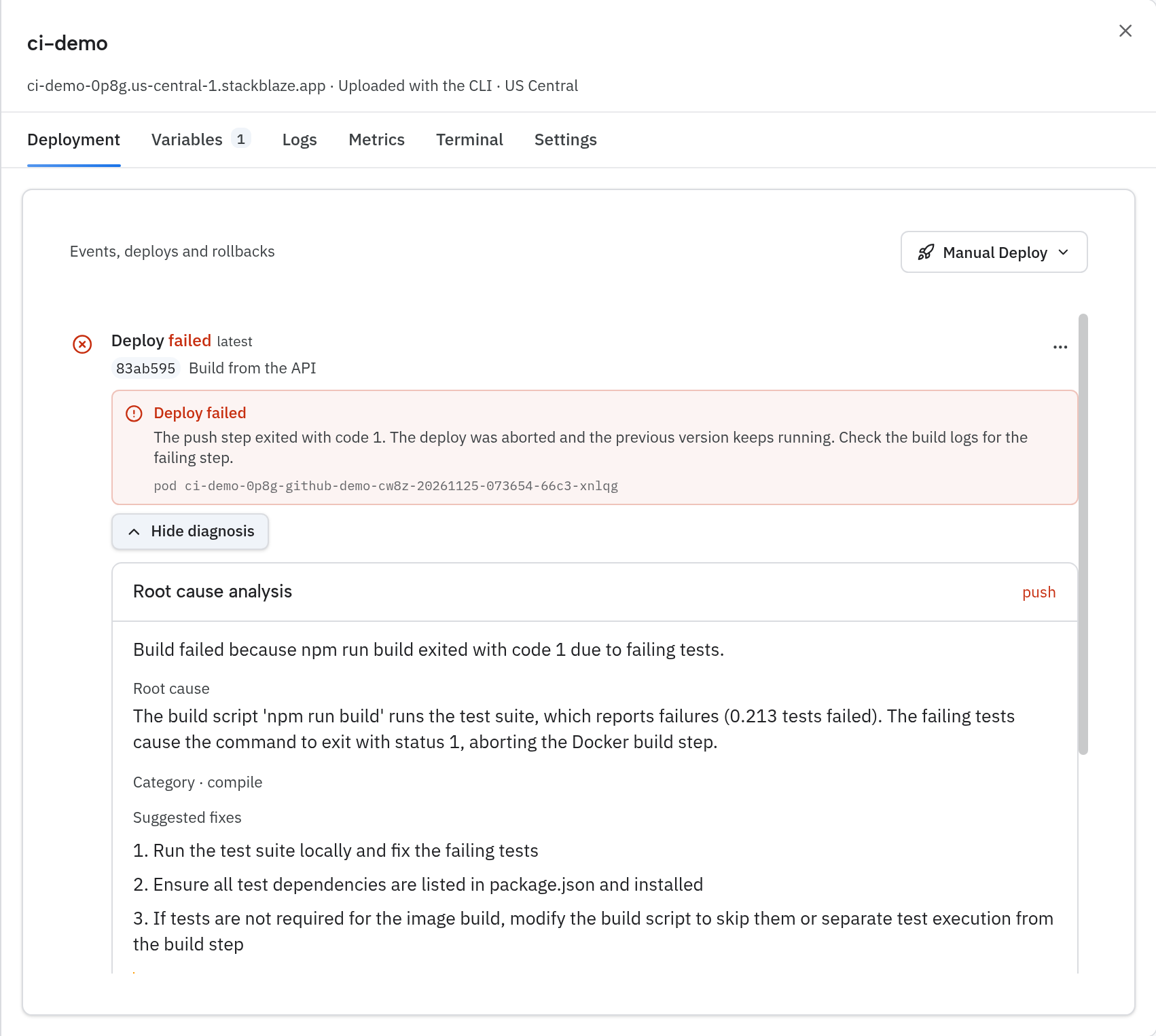
Click Diagnose. A Root cause analysis reads the build or rollout logs and gives a summary, the Root cause, a Category and Suggested fixes. It's written by AI from the logs, so check it against the logs before acting on it. Hide diagnosis folds it away.
From the terminal, stackblaze deployments list shows each deploy's status (for example build_failed), and stackblaze builds logs prints a build's log.
Common failures
| What you see | Likely cause | What to do |
|---|---|---|
| Deploy failed, the build step exited with a code | A command in your build failed: a script, a missing dependency, a test run during the build | Read the build log for the first error. Run the same build locally. |
| The deploy stays rolling out and never goes live | The new version never passes its health check: the app doesn't answer on the checked path, or it listens on the wrong address or port | See The app never becomes ready. |
| A build is refused: "Your plan runs 1 build at a time and one is running." | The organization already runs as many builds as its plan allows | Wait for a build to finish, or upgrade. See Build limits. |
| The app still has an old value | Variable and setting changes are staged until you commit and deploy them | Click Commit and Deploy (see Environment variables). Check you changed the right environment. |
No DATABASE_URL in the app | The database isn't connected to this service, or it's in another environment | In the database's panel, turn the app on under Connections, then deploy (see PostgreSQL). |
| The service keeps restarting, and Memory usage on Metrics is at the service's size | It runs out of memory | Give the service a bigger size (see Scaling), or make the app use less. |
The app never becomes ready
A new version takes traffic only once its health check passes. Until then the old version keeps serving, and the deploy stays rolling out. The usual causes:
- The app listens on
127.0.0.1orlocalhost. That address only answers from inside the app's own container, so the health check never reaches it. Listen on0.0.0.0(all addresses) instead. When we deployed a Node.js app withlisten(port, '127.0.0.1'), the build succeeded and the log saidlistening on 127.0.0.1:3000, but the new instance was restarted again and again ("Instance crashed (restarted 2 times)") while the old version kept serving.stackblaze up --ci --waitended with"ready":false,"timedOut":trueand exit code 1. - The app listens on another port. StackBlaze sets
PORTfor the app; read it, as inprocess.env.PORT. - The checked path doesn't answer. The check requests
/by default. Point it at a path that answers quickly, or give a slow app more Startup time (90 seconds by default). See When the check fails.
Deploying a fixed version replaces the stuck one.
Ask support
If you're still stuck, open a request from Support in the sidebar (see Support). As the form says, "Include timestamps and error text when relevant — it helps us respond faster." Also say which project, environment and service it's about, and paste the failed row's message or the first error in the build log.