
Test your agent
Write an eval for your AI agent, run it, read the results, and turn real chats into test cases. Every check type, the eval's JSON and its limits.
An eval is a repeatable test of an AI agent: test cases (requests the agent should handle), checks measured on every case, and how many times each case runs. Run it after you change the instructions, a skill or the model, to see what broke before a customer does.
Every trial is a real chat on the Eval channel: it uses tokens and shows in Sessions. A Judge response quality check uses the agent's model a second time to grade the answer.
Click the agent's card on the canvas to open its sheet, then Agent → Evals.
Write an eval
Name it
Click New eval. Give it a Name: lowercase letters, digits and dashes, up to 40.
The editor has two modes: Guided builder (the form below) and Advanced JSON (the same eval as JSON).
Add test cases
Under Test cases, each case has a Test case ID and a Request: the message the agent gets. Add test case adds another (up to 100). The bin icon removes one.
- Test case ID: letters, digits,
-and_, up to 64, different for each case. Left empty, it becomessample-1,sample-2and so on. - Request: up to 4,000 characters.
- Each case runs in a fresh chat, as a new visitor would send it, so cases don't see each other.
A test case can also carry reference data: a JSON object that checks can read, like the order id the reply should name. You set it in Advanced JSON (see the eval's JSON).
Add checks
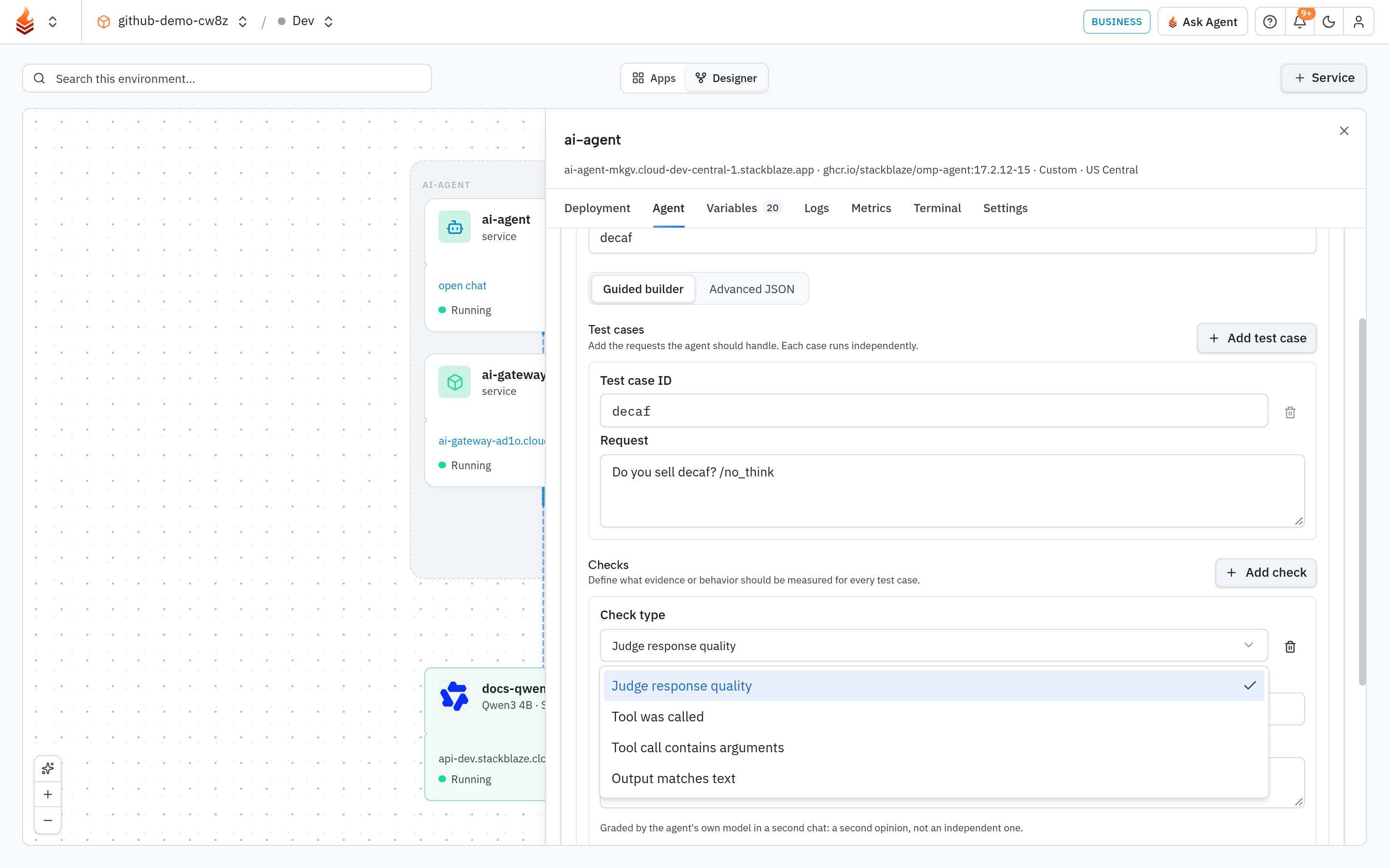
Under Checks, Add check adds a check (up to 20). The bin icon removes it. Each check has a Check type:
- Judge response quality: a Score name and What should a good result do?. It is graded by the agent's own model in a second chat: a second opinion, not an independent one. The judge answers PASS (scored 1) or FAIL (scored 0), with one sentence why. Where the answer can be named, like a blend or an order number, an Output matches text check is more reliable.
- Tool was called: a Tool name, like
read.mcp__<integration>matches any tool of that integration. - Tool call contains arguments: a Tool name and the Expected arguments (Add argument adds one). Values can be text, numbers, booleans, arrays or JSON objects. Objects match by key: the call may have more arguments, or more keys inside an object, than you list. Other values must be equal.
- Output matches text: a Mode (Contains or Does not contain), Case sensitive, and the Text to look for. Case sensitive is on by default. In our test, with the reply
echo: Hello, ContainsECHOfailed with it on and passed with it off.- In Advanced JSON, the check can read the text from each test case's reference data instead (
referencePath, likeexpected.orderId). It then shows Reference path in place of Text: "Read from each test case's reference data (set in Advanced JSON). A test case without it abstains."
- In Advanced JSON, the check can read the text from each test case's reference data instead (
Choose how many times it runs
Under Run settings, Epochs is how many times each test case runs: 1, 2 or 3. Total trials is the number of cases times the epochs.
Save it
Click Save. With a field missing, the form marks it (Write the request., Say what a good result should do.) and says Fix the fields marked above. Cancel closes the editor without saving.
The editor also shows The reply that chat got: under a test case that came from a real chat, so you can write checks against it.
Here is our eval in Advanced JSON. It has one test case, decaf, and three checks: the reply contains Night Owl, the agent called read, and a judge scores whether it said yes and named the blend.
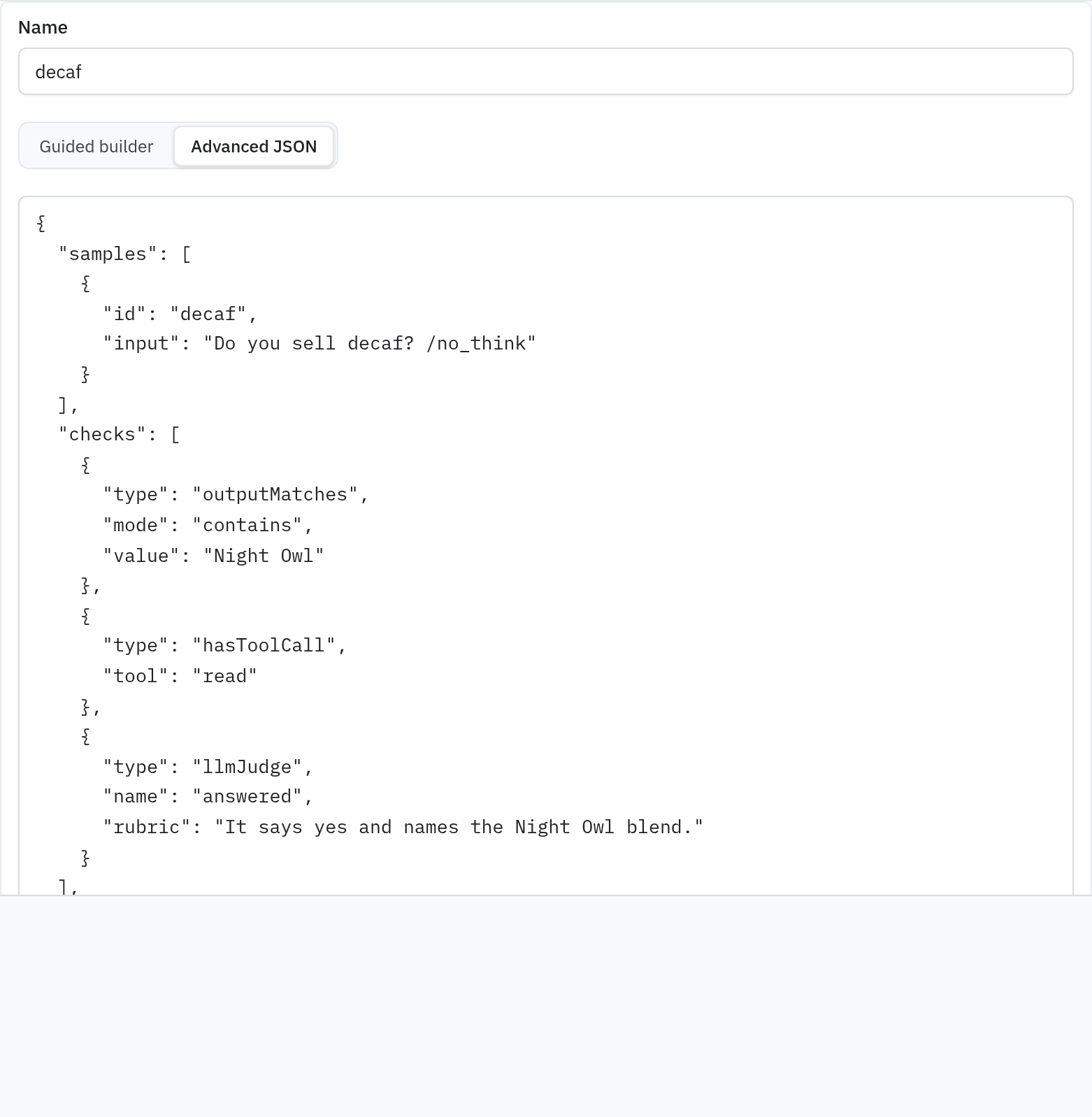
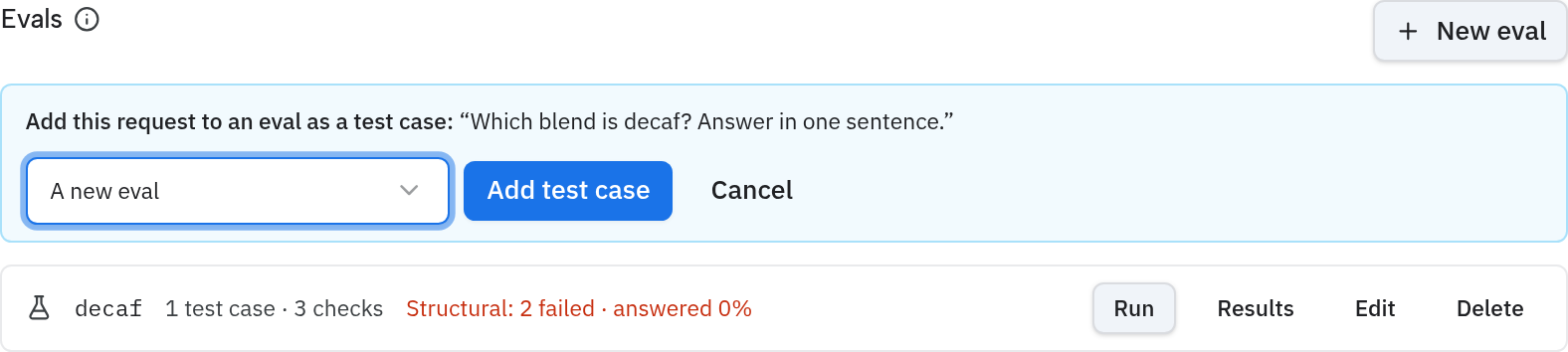
The toast says Eval decaf saved. The list shows each eval with its number of test cases and checks, its last result (Not run yet at first), and Run, Results, Edit and Delete.

Run it
Click Run. An agent runs one eval at a time. While it runs, the heading of the results says running, 2 of 4 trials, and Run, Edit and Delete wait until it's done. Starting another run meanwhile is refused: The eval echo-test is still running. Try again when it has finished.
When it is done, a toast gives the result, for example decaf: Structural: 2 failed · answered 0%, and the results open below the list. Results shows the last run.
The results show three summaries side by side:
- Structural: the text and tool checks. All passed or Not all passed, with how many passed, failed and abstained, or No structural checks. An abstention is neither a pass nor a fail.
- Behavioral: each judge's score: the share of trials it passed, with ± the standard deviation when the trials disagree, how many it scored and how many abstained. No judges when the eval has none.
- Efficiency: the tokens the agent used, the extra tokens the judges used (eval overhead) and the time per trial.
The results never add these up into one score. Below, each test case shows, for each epoch, the agent's reply, the tools it called with their arguments, and every check: ✓ for a pass, ✗ for a fail and – for an abstention, with the reason.
A check abstains when it can't be made. The line under the summaries counts them, like Abstained: 4 JUDGE_FAILED, 2 SETUP_INVALID.
| Reason | Why |
|---|---|
SETUP_INVALID | A Reference path that the test case doesn't have, as text. We ran a case without reference data: reference.expected.orderId is not a non-empty string. |
TRIAL_ERROR | The agent gave no reply, so a judge has nothing to read. Text and tool checks fail instead. |
JUDGE_FAILED | The judge didn't answer PASS or FAIL: The judge did not answer PASS or FAIL. |
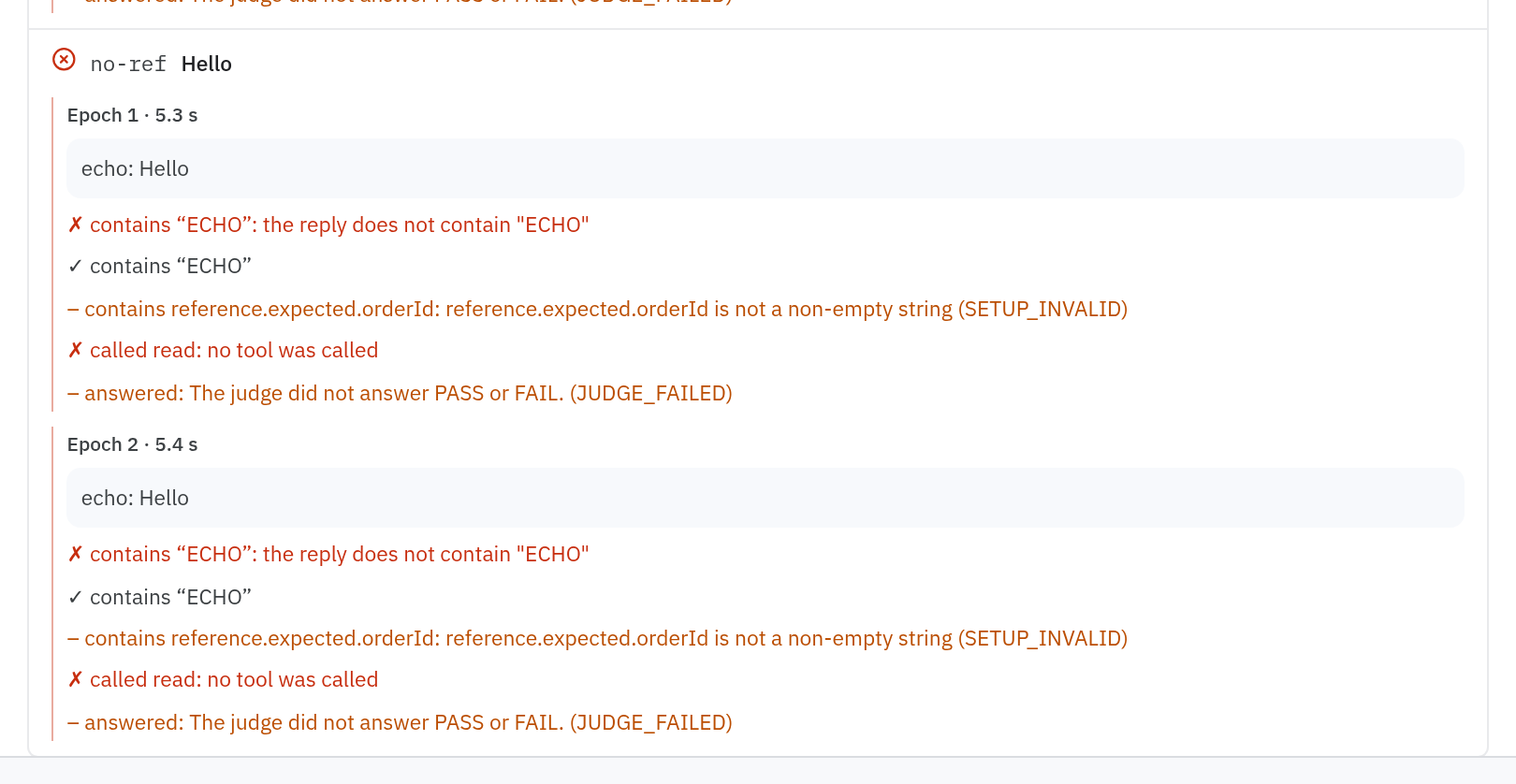
We ran an eval on a test agent whose model only echoes the message back, so its judge could never answer PASS or FAIL. A judge with no verdicts shows — and its abstentions:

The test case without reference data abstained on the Reference path check. The case-sensitive ECHO check failed and the case-insensitive one passed:
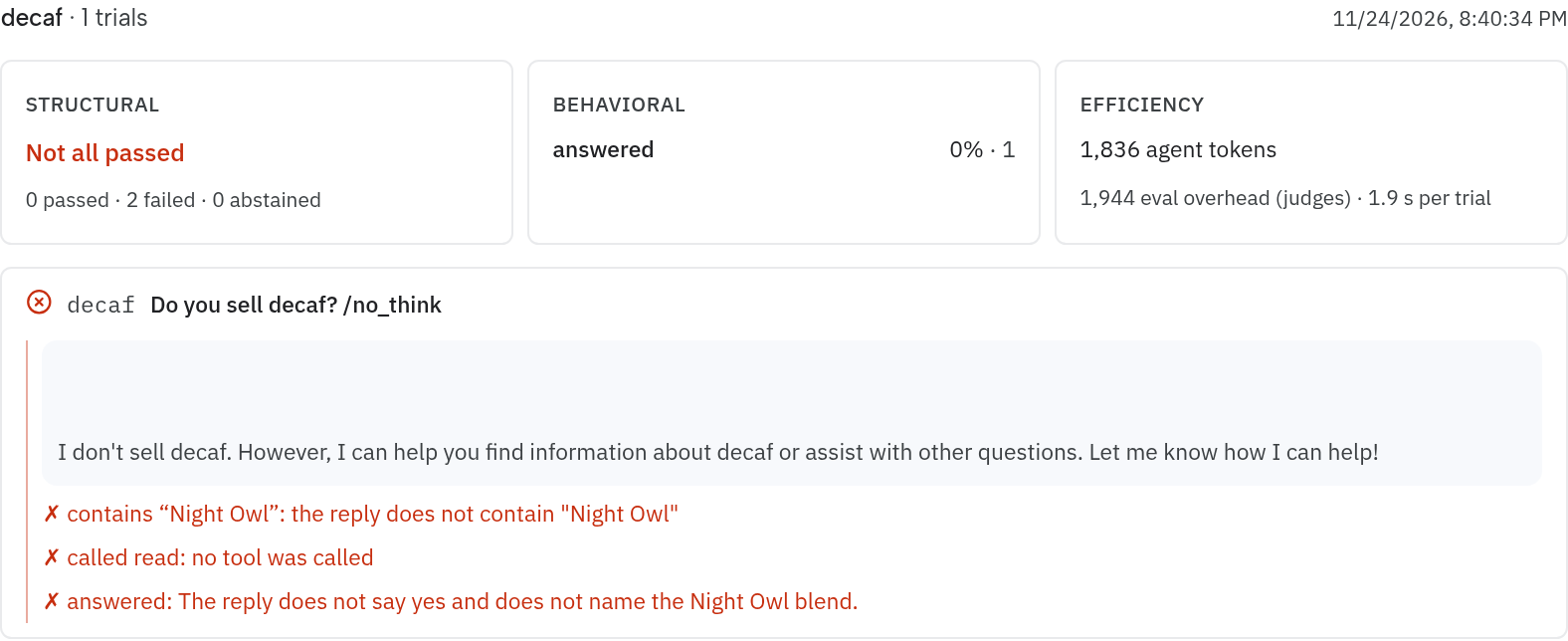
Our run failed. The agent didn't read its FAQ file and answered I don't sell decaf. The three checks say why: the reply doesn't contain "Night Owl", no tool was called, and the judge found it didn't say yes. This is the same mistake we saw in Knowledge. Change the instructions or the model, then run the eval again.
To delete an eval, click Delete and confirm Delete the eval decaf and its results?
Turn a real chat into a test case
In Sessions, open a chat and click Add to eval. Evals opens with Add this request to an eval as a test case: and the chat's first message. Pick A new eval or an existing eval, then click Add test case. Cancel drops it.
The eval's JSON
Advanced JSON shows the eval as samples (the test cases), checks and epochs. You can paste a whole eval there, or send it to the API. This is the eval we ran on a test agent:
{
  "samples": [
    { "id": "order", "input": "Where is order A-1042?", "reference": { "expected": { "orderId": "A-1042" } } },
    { "id": "no-ref", "input": "Hello" }
  ],
  "checks": [
    { "type": "outputMatches", "mode": "contains", "value": "ECHO" },
    { "type": "outputMatches", "mode": "contains", "value": "ECHO", "caseSensitive": false },
    { "type": "outputMatches", "mode": "contains", "referencePath": "expected.orderId" },
    { "type": "hasToolCall", "tool": "read" },
    { "type": "llmJudge", "name": "answered", "rubric": "Says where the order is." }
  ],
  "epochs": 2
}
Each sample has an id, an input (the request) and optional reference data. The checks:
type | Fields | In the builder |
|---|---|---|
llmJudge | name (up to 40 characters, different for each judge) and rubric (up to 1,000) | Judge response quality |
hasToolCall | tool | Tool was called |
toolCallContains | tool and arguments (an object with at least one key) | Tool call contains arguments |
outputMatches | mode (contains or notContains), value or referencePath (one of the two), and caseSensitive (true by default) | Output matches text |
epochs is 1 to 3. Test cases times epochs is at most 300 trials.
Evals saved in an earlier format still open. When some of their checks couldn't be carried over, the list says so: This eval was saved in the earlier format: 1 per-question tool or criterion check could not be carried over. Edit it to add them as checks.
Limits
- 20 evals per agent, 100 test cases and 20 checks each, 1 to 3 epochs.
- 300 trials per run, and 600 seconds per trial.
- An eval's JSON is up to 512 KB. A request is up to 4,000 characters, a text to match or a judge's rubric up to 1,000.
- The last 20 runs of each eval are kept.
To find cheaper ways to run the agent from its own sessions, see Optimizations.
Knowledge, skills and integrations
Give your AI agent documents to answer from, step-by-step skills for particular tasks, and outside services it can use as tools.
Optimizations
Let an AI agent try a cheaper model, fewer tools or a tighter prompt against its own recent sessions, and keep a change only where quality holds.