
Optimizations
Let an AI agent try a cheaper model, fewer tools or a tighter prompt against its own recent sessions, and keep a change only where quality holds.
An optimization tries cheaper ways to run an AI agent against its own recent sessions: a cheaper model, fewer tools, a tighter prompt. It recommends a change only where quality holds up, and nothing changes until you accept it.
Click the agent's card on the canvas to open its sheet, then Agent → Optimizations.
Before you start
- The agent must be on its AI Gateway. Costs are priced at the gateway's list prices. An agent that talks to an AI model directly shows Optimizations need the agent on its AI Gateway: costs are priced there. Move it to a gateway model first: see Change its model.
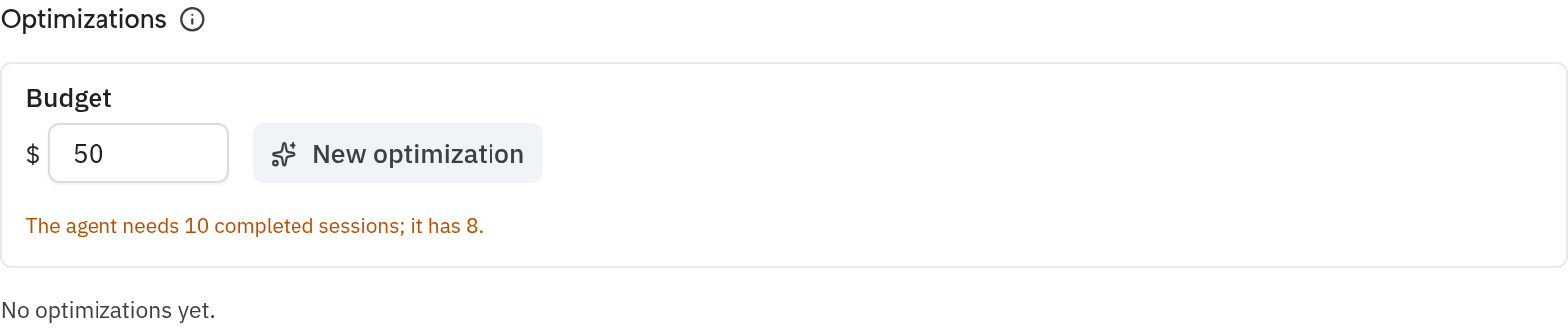
- It needs 10 completed sessions. The run builds its test from the 10 newest chats that had at least one turn. Eval chats don't count. Until then, New optimization is greyed out with The agent needs 10 completed sessions; it has 8.
Start a run
Set a Budget from $1 to $500 (it starts at $50) and click New optimization.
- The run stops once it has spent its budget. Every trial is a real chat on the Eval channel and uses tokens like any other.
- The run goes on in the agent if you close the panel. The panel shows how far it is, like 4 of 20 trials, and $0.12 of $1.00 budget.
- An agent runs one optimization at a time. Starting another is refused: An optimization is already running.
The run gets its own gateway key, made for it alone. The key is capped at the budget, works only for the agent's current model and the cheaper ones of the same provider, and expires after 12 hours. The agent keeps it in memory only, and it is deleted when you accept, dismiss or cancel.
What a run does
-
Builds an eval from recent sessions. Each of the 10 sessions becomes a sample: its first message, and a reference that says what a good reply achieves, written from what the agent did and said.
-
Runs the current setup against it. The agent as it is must pass its own history. A sample it fails is looked at and repaired or dropped, for up to two rounds.
-
Tries cheaper setups against the same eval, each twice:
Setup What it changes Model A cheaper model of the same provider on the AI Gateway Tool trim Removes the built-in tools the sessions never called. Integration tools are kept. Prompt rewrite A tighter rewrite of the instructions Combined: model + tool trim The best cheaper model together with the best tool trim. Never the prompt rewrite: a prompt tuned for one model may not suit another. A setup that can't be tried says why, for example No cheaper model of the same provider on the AI Gateway., The sessions called every declared tool. or The agent has no instructions to rewrite.
-
Compares each one with the baseline, the current setup.
Read the results
The run shows each setup in a table. The first row, Current setup, is the Baseline:
| Column | What it shows |
|---|---|
| Setup | The setup and what it changes, like Model current → cheaper or Remove tools: grep, glob. The rewritten instructions opens the new prompt. |
| Verdict | How it did against the baseline |
| Quality | The share of trials the judge passed, on the samples scored on both sides, and the change in points |
| Cost per run | Dollars per run at the AI Gateway's list prices, and how much cheaper or dearer it is |
| Trials | How many trials completed |
The verdicts:
| Verdict | Means |
|---|---|
| Quality held | Within 5 points of the baseline, or better |
| Slight drop | Dropped by up to 15 points |
| Quality dropped | Dropped by more than 15 points |
| Behavior changed | Lost a tool call or a check the baseline passed. The line under the setup says what was lost. |
| Not enough trials | Fewer than 80% of its trials completed, or fewer than 80% of the samples were scored on both sides |
Only a setup with Quality held that is also cheaper can be Recommended, and the cheapest of those wins. Without one, the run ends with Done: no cheaper setup held up.
We ran one with a $1 budget on a test agent whose model only echoes the message back. Its judge could never give a verdict, so no trial completed: both setups it tried got Not enough trials, and the run ended with Done: no cheaper setup held up. The gateway had no cheaper model, so Model was skipped. Tool trim: 3 → 0 would have removed all three of its tools, which the sessions never called.
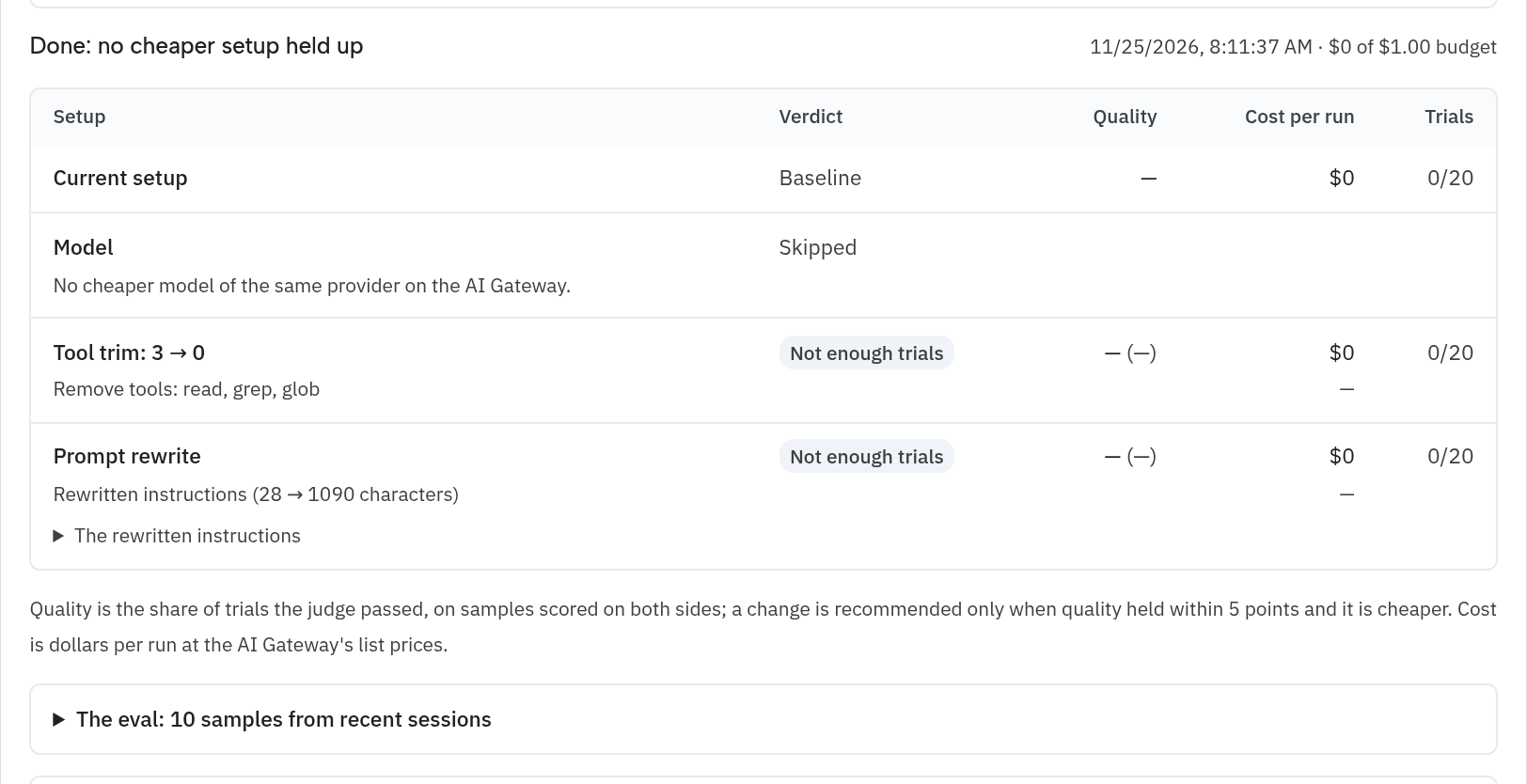
At the bottom, The eval: 10 samples from recent sessions lists each sample, with Judged against: and its reference. A sample that was repaired says so, with why, and a dropped one is listed with the reason.
Accept, dismiss or cancel
- Accept applies the recommended change to the agent's settings and restarts it. It checks first that the change still applies: the model must still be on the AI Gateway, and tools may only be removed. There's no one-click undo: to go back, change the settings by hand.
- Dismiss keeps the agent as it is.
- Cancel run stops a running run. A change waiting for a decision is dismissed.
The list under New optimization shows the last 10 runs, each with its result, what it spent and Open.
A run ends if the agent restarts. Changing its settings, adding or removing an integration, or updating it while a run is going stops the run with The agent restarted during the run.