
Usage
What your apps have used this billing period, what it costs, the rate for each resource and your plan's limits.
The Usage page shows what your apps have used this billing period, what that costs, the rate each resource is billed at and how close you are to your plan's limits. The header gives the period, for example "What your apps are using this period, Nov 11 – Dec 11."
Open Usage
In the sidebar, under Administration, click Usage.
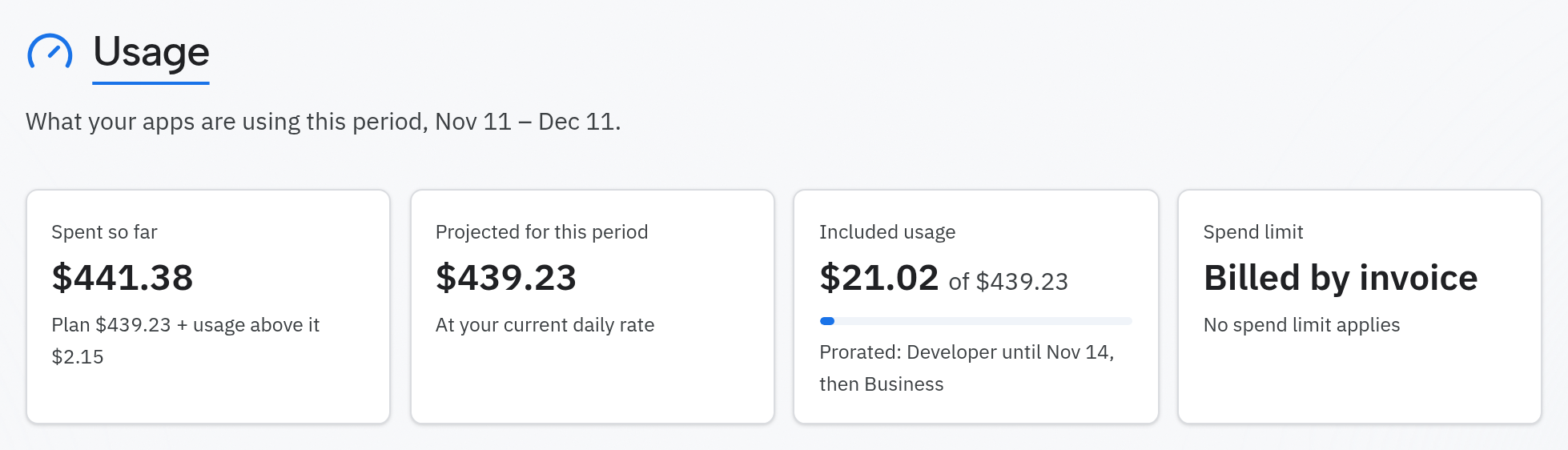
The summary cards
| Card | Shows |
|---|---|
| Spent so far | What this period has cost so far: your plan, plus any usage above it ("Plan $439.23 + usage above it $2.15"). |
| Projected for this period | What the period will cost "At your current daily rate". |
| Included usage | How much of your plan's included usage your apps have used, for example "$21.01 of $439.23", with a bar. If you changed plan during the period, the included usage is prorated and the card says so: "Prorated: Developer until Nov 14, then Business". |
| Spend limit | Your organization's spend limit. An organization billed by invoice sees Billed by invoice and "No spend limit applies". |
The included usage is the plan price: $10 a month on Developer, $29 on Pro and $499 on Business (see Billing).
Usage breakdown
Usage breakdown lists what your apps used this period, one row per resource, with the rate under each name, what was used and what it cost.
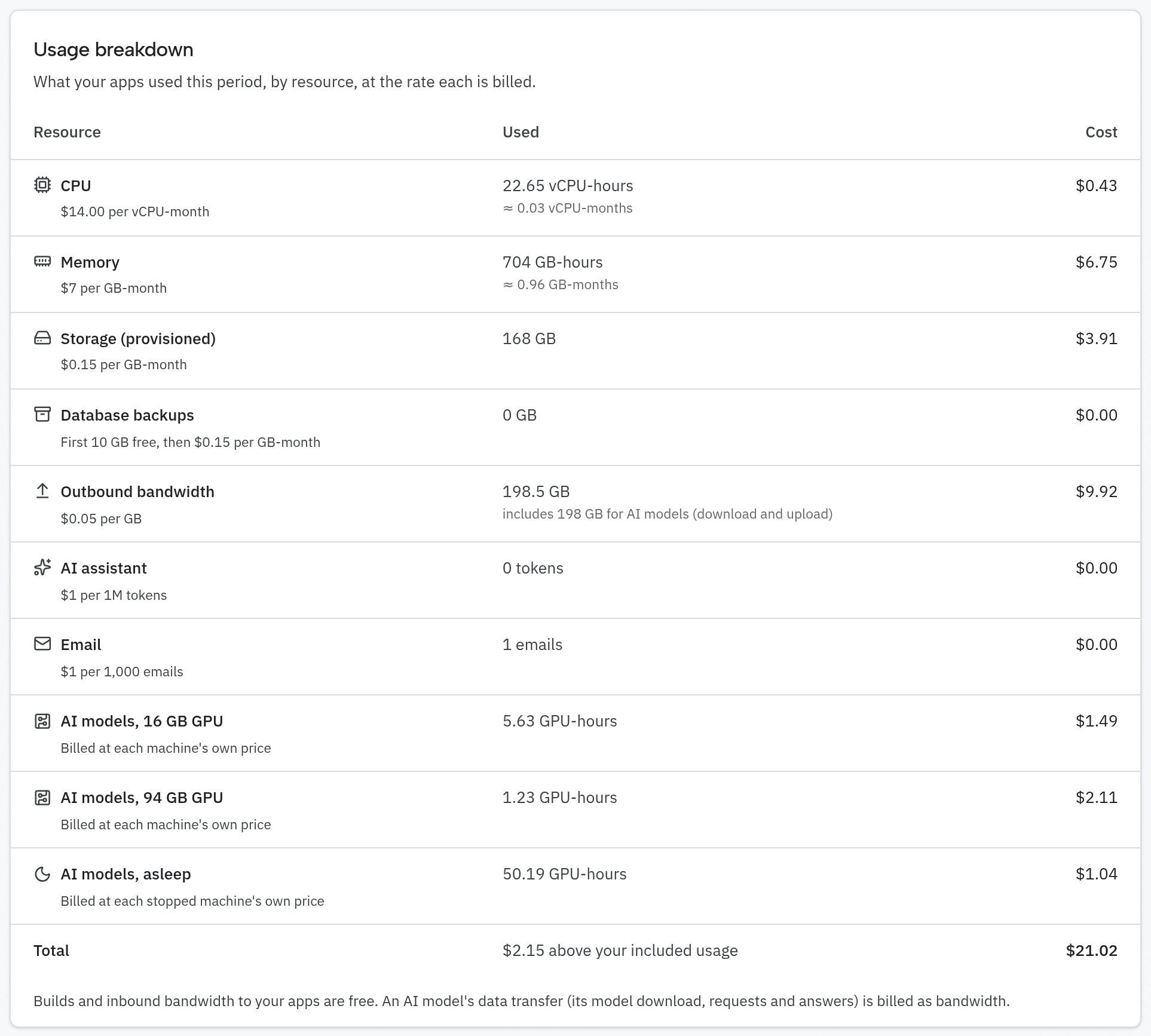
| Resource | Rate | Used is counted in |
|---|---|---|
| CPU | $14.00 per vCPU-month | vCPU-hours, with the same in vCPU-months below |
| Memory | $7 per GB-month | GB-hours, with the same in GB-months below |
| Storage (provisioned) | $0.15 per GB-month | GB of volumes |
| Database backups | First 10 GB free, then $0.15 per GB-month | GB of backups |
| Outbound bandwidth | $0.05 per GB | GB transferred, with what AI models transferred below |
| AI assistant | $1 per 1M tokens | tokens |
| $1 per 1,000 emails | emails | |
| AI models, 16 GB GPU (one row per GPU size used) | Billed at each machine's own price | GPU-hours |
| AI models, asleep | Billed at each stopped machine's own price | GPU-hours |
A month here is 730 hours, so 730 vCPU-hours is one vCPU-month. There is one AI model row for each GPU size your models ran on this period.
The Total row gives the period's usage cost and how it compares with your included usage, for example "$2.15 above your included usage".
Builds and inbound bandwidth to your apps are free. An AI model's data transfer (its model download, requests and answers) is billed as bandwidth.
Plan limits
Plan limits shows what your plan allows in this organization and how much of it you use, each with a bar.
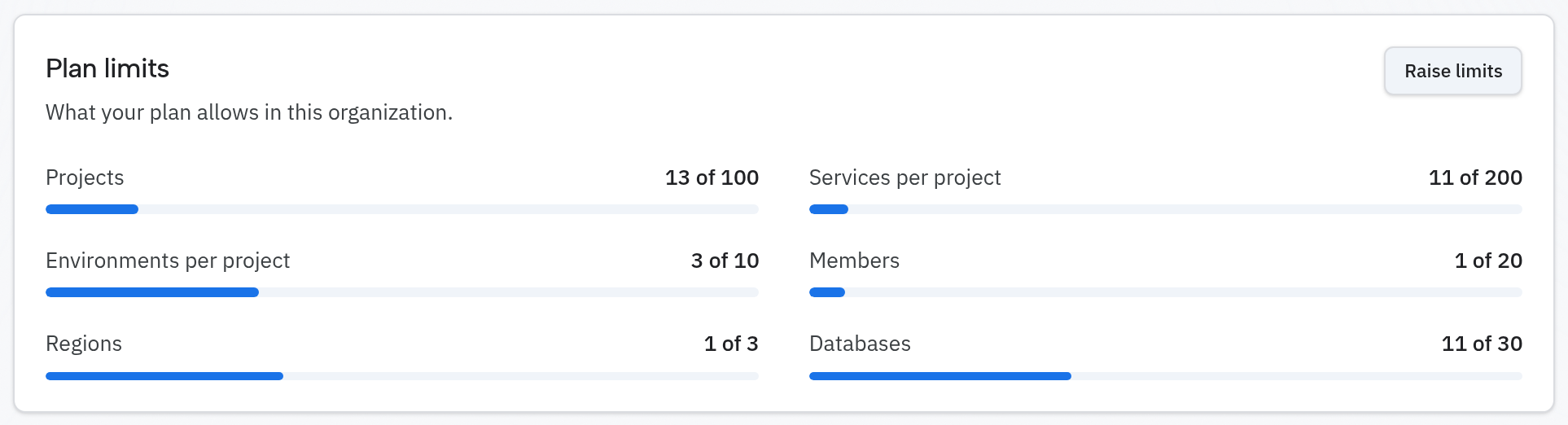
| Limit | Developer | Pro | Business |
|---|---|---|---|
| Projects | 5 | 25 | 100 |
| Services per project | 20 | 50 | 200 |
| Environments per project | 2 | 5 | 10 |
| Members | 1 | 5 | 20 |
| Regions | 1 | 3 | 3 |
| Databases | 2 | 10 | 30 |
Raise limits opens the Change plan window, where you pick another plan. Close it with × to leave your plan as it is.